OSC Commands
MadMapper allows you to map any OSC address to any parameter using the Controls dialog found under the Edit menu. However, all parameters also have predefined addresses, allowing you to directly send OSC messages to those addresses to change parameters. Using predefined addresses means you bypass any input range, output range, or filtering settings within MadMapper.
You can find predefined OSC addresses using the following methods:
-
Right-clicking a widget and choosing "Copy OSC address".
-
Pressing the "+" button in the Controls Dialog to view the address hierarchy.
-
Selecting a control from the list on the left and using the Edit/Copy command.
-
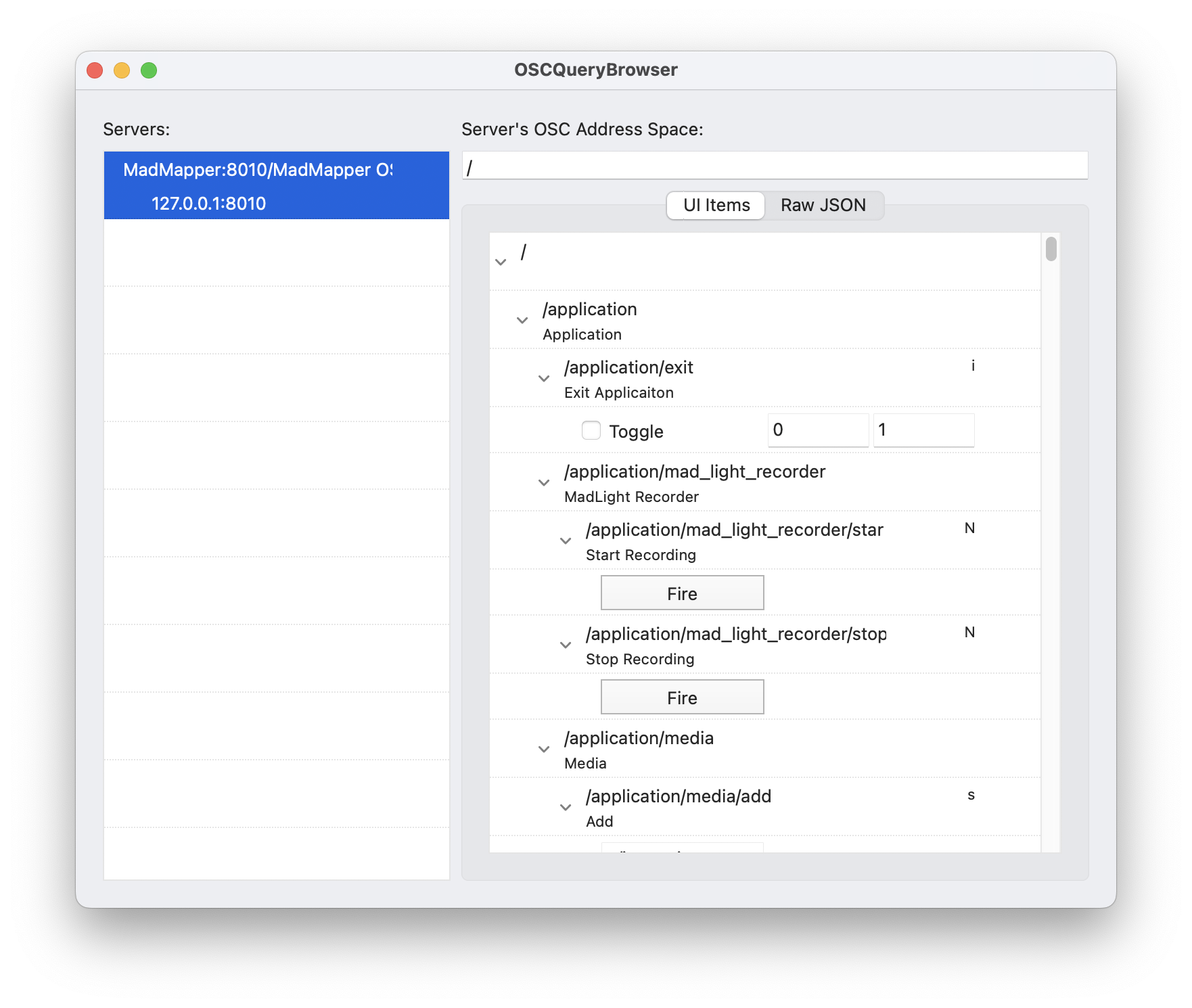
Exploring the network using an OSC Query-enabled application.
OSC Query Support
MadMapper fully supports the OSC Query protocol. OSC Query acts as a dynamic network directory, allowing software to expose its entire OSC address space to the local network.
Because of this, you do not have to memorize or manually type out predefined addresses. You can use OSC Query-compatible software—such as the OSC Query Browser, Chataigne, or another copy of MadMapper on another computer—to automatically discover MadMapper on your network. These external applications can actively browse MadMapper's available parameters, view current values, and instantly link commands to control MadMapper from outside sources.
OSC Routing & Preferences
To enable OSC Query, define your incoming and outgoing OSC network ports, or toggle network discovery, navigate to the Preferences > OSC / MIDI tab. It is crucial to ensure your external controllers and MadMapper are communicating over the correct ports (typically Port 8000 for incoming OSC data).
OSC Channels List
Understanding the basic data types is essential when sending OSC commands to MadMapper. Depending on the parameter, you will need to send a specific type of value:
-
(BOOL) - Boolean: A simple 1 (On) or 0 (Off) switch. Used for toggling checkboxes or play/pause states.
-
(FLOAT) - Floating-Point Number: A decimal number (e.g., 0.5). Used for continuous parameters like opacity, position, or color values.
-
(INT) - Integer: A whole number (e.g., 5). Used for discrete selections like index numbers.
-
(STRING): Text characters (e.g., "My_Video.mp4"). Used for names or file paths.
-
(nil) - No Argument: Requires no value. Simply sending the address acts as a trigger (e.g., restarting a clip).
Below is the consolidated list of MadMapper's internal OSC addresses.
Application
System & Session
-
/application/exit (nil)
-
/application/shutdown_computer (nil)
-
/application/restart_computer (nil)
-
/application/mad_light_recorder/start_recording (nil)
-
/application/mad_light_recorder/stop_recording (nil)
View & Interface
-
/application/view/active_tab (STRING/INT)
-
/application/view/fullscreen (BOOL)
-
/application/view/mode (STRING/INT)
-
/application/view/orientation (STRING/INT)
Preview Controls
-
/application/preview/mode/output (BOOL)
-
/application/preview/mode/previewed (BOOL)
-
/application/preview/mode/previewed_plus_output (BOOL)
-
/application/preview/mode/selection (BOOL)
-
/application/preview/additional_text (STRING)
Media Management
-
/application/media/add (STRING - File Path)
-
/application/media/remove (STRING - File Name)
Master
Levels & Speed
-
/master/master_level (FLOAT)
-
/master/master_video_level (FLOAT)
-
/master/master_audio_level (FLOAT)
-
/master/master_dmx_level (FLOAT)
-
/master/master_laser_level (FLOAT)
-
/master/audio_input_level (FLOAT)
-
/master/engine_speed (FLOAT)
-
/master/reset_engine_speed (nil)
Global BPM
-
/master/Global_BPM/Ableton_Link (BOOL)
-
/master/Global_BPM/BPM (FLOAT)
-
/master/Global_BPM/BPM_Source (INT/STRING)
-
/master/Global_BPM/Resync (nil)
-
/master/Global_BPM/TAP (nil)
Engine & Output Freezes
-
/master/freeze_engine (BOOL)
-
/master/freeze_video_output (BOOL)
-
/master/freeze_dmx_output (BOOL)
-
/master/freeze_laser_output (BOOL)
Master Color Control
-
/master/video_color/rgba (Color)
-
/master/video_color/[red, green, blue, hue, saturation, value] (FLOAT)
-
/master/laser_color/rgba (Color)
-
/master/laser_color/[red, green, blue, hue, saturation, value] (FLOAT)
Output Cursors & Overlays
-
/master/show_info_on_outputs (BOOL)
-
/master/test_pattern (BOOL)
-
/master/output_video_cursor (BOOL)
-
/master/output_video_cursor_size (FLOAT)
-
/master/output_video_cursor_color/[red, green, blue, hue, saturation, value, rgba]
-
/master/output_laser_cursor (BOOL)
-
/master/output_laser_cursor_level (FLOAT)
-
/master/output_laser_cursor_size (FLOAT)
-
/master/output_laser_cursor_color/[red, green, blue, hue, saturation, value, rgba]
Media
Note: Replace [media_name] with the exact name of the file in your media bin (e.g., My_Video or Lines). Generative materials and shaders will expose their own unique parameters under their media name.
General Selection
-
/media/select (INT)
-
/media/select_by_name (STRING)
-
/media/next (nil)
-
/media/previous (nil)
-
/media/per_type_selection/next_[media_type] (nil) (Options: generator, image, image_folder, isf, laser_generator, laser_material, live_input, material, montage, movie, quartz, syphon)
-
/media/per_type_selection/previous_[media_type] (nil)
Specific Media Actions
-
/media/[media_name]/select (BOOL)
-
/media/[media_name]/assign (nil)
-
/media/[media_name]/assign_to_all_surfaces (nil)
-
/media/[media_name]/restart (nil)
Material/Generator Specific Parameters
-
/media/[media_name]/[Parameter_Group]/[Parameter] (e.g., /media/Lines/Global/Line_Width or /media/Grid/Color/rgba). You can discover these custom paths by right-clicking the specific material parameter in MadMapper and selecting "Copy OSC Address".
Modules
-
/modules/select (INT)
-
/modules/select_by_name (STRING)
-
/modules/select_next (nil)
-
/modules/select_previous (nil)
Outputs
Note: Replace [1-X] with the specific hardware output or buffer number you are targeting (e.g., Video-Output-1).
Video Outputs & Buffers
-
/outputs/Video-Output-[1-X]/enabled (BOOL)
-
/outputs/Video-Output-[1-X]/publish_loopback (BOOL)
-
/outputs/Video-Output-[1-X]/publish_to_ndi (BOOL)
-
/outputs/Video-Output-[1-X]/publish_to_syphon_spout (BOOL)
-
/outputs/Video-Output-[1-X]/Save_Video_Snapshot (nil)
-
/outputs/Video-Output-[1-X]/show_desktop_window (BOOL)
-
/outputs/Video-Output-[1-X]/show_test_pattern (BOOL)
-
/outputs/Video-Buffer-[1-X]/enabled (BOOL)
-
/outputs/Video-Buffer-[1-X]/Save_Video_Snapshot (nil)
Laser Outputs & Buffers
-
/outputs/Laser-Output-[1-X]/enabled (BOOL)
-
/outputs/Laser-Output-[1-X]/publish_loopback (BOOL)
-
/outputs/Laser-Output-[1-X]/show_test_pattern (BOOL)
-
/outputs/Laser-Output-[1-X]/Record_ILDA_Movie (BOOL)
-
/outputs/Laser-Output-[1-X]/Save_ILDA_Frame (nil)
-
/outputs/Laser-Output-[1-X]/Device/PPS (INT)
-
/outputs/Laser-Output-[1-X]/Device/Delay (FLOAT)
-
/outputs/Laser-Output-[1-X]/ILDA/[Desired_FPS, Scan_Area, Blank_Delay] (FLOAT)
-
/outputs/Laser-Output-[1-X]/Distortion/[Level_X, Level_Y] (FLOAT)
-
/outputs/Laser-Output-[1-X]/Color_Levels/[Red, Green, Blue] (FLOAT)
-
/outputs/Laser-Output-[1-X]/Color_Delay/[Red, Green, Blue] (FLOAT)
-
/outputs/Laser-Output-[1-X]/Min_Voltage/[Red, Green, Blue] (FLOAT)
-
/outputs/Laser-Output-[1-X]/Response/[Red, Green, Blue] (FLOAT)
-
/outputs/Laser-Buffer-[1-X]/enabled (BOOL)
-
/outputs/Laser-Buffer-[1-X]/Record_ILDA_Movie (BOOL)
-
/outputs/Laser-Buffer-[1-X]/Save_ILDA_Frame (nil)
DMX Outputs
-
/outputs/DMX-Output-[1-X]/enabled (BOOL)
Timelines & Conductor
Global Timeline Actions
-
/timelines/active_bank(STRING) -
/timelines/Bank-[1-X]/select(BOOL) -
/timelines/Bank-[1-X]/setup(BOOL) -
/timelines/Bank-[1-X]/by_name(STRING)
Timeline Editor
-
/timelines/editor/[play, pause, record, loop](BOOL) -
/timelines/editor/stop(nil) -
/timelines/editor/reenable_automation(nil) -
/timelines/editor/go_to_next_frame(nil) -
/timelines/editor/go_to_previous_frame(nil) -
/timelines/editor/go_to_next_marker(nil) -
/timelines/editor/go_to_previous_marker(nil)
Master Conductor Controls
-
/timelines/Bank-[1-X]/conductor/[play, pause, loop_enabled](BOOL) -
/timelines/Bank-[1-X]/conductor/[stop, play_from_beginning](nil) -
/timelines/Bank-[1-X]/conductor/position(FLOAT) -
/timelines/Bank-[1-X]/conductor/speed(FLOAT) -
/timelines/Bank-[1-X]/conductor/loop_start(FLOAT) -
/timelines/Bank-[1-X]/conductor/loop_end(FLOAT) -
/timelines/Bank-[1-X]/conductor/go_to_next_marker(nil) -
/timelines/Bank-[1-X]/conductor/go_to_previous_marker(nil)
Conductor Markers
-
/timelines/Bank-[1-X]/conductor/markers/go_to_marker_by_name(STRING) -
/timelines/Bank-[1-X]/conductor/markers/[MarkerName]/enabled(BOOL) -
/timelines/Bank-[1-X]/conductor/markers/[MarkerName]/[go, go_and_play, actions](nil)
Conductor Montage Parameters
-
/timelines/Bank-[1-X]/conductor/Montage-[1-X]/[Media_Name]/[Property](e.g.,/timelines/Bank-1/conductor/Montage-1/My_Video/Scale)
Column Execution
-
/timelines/Bank-[1-X]/columns/start_by_number(INT) -
/timelines/Bank-[1-X]/columns/start_next(nil) -
/timelines/Bank-[1-X]/columns/start_previous(nil) -
/timelines/Bank-[1-X]/columns/[1-16](BOOL - Triggers specific column)
Cue Matrix (Grid Execution) Note: Replace [1-16] with your Column/Cell number, and [1-32] with your Row number. You can also use col_current to target the currently active column.
-
/timelines/Bank-[1-X]/by_cell/start_cell_on_next_column(nil) -
/timelines/Bank-[1-X]/by_cell/start_cell_on_previous_column(nil) -
/timelines/Bank-[1-X]/by_cell/start_cell_on_next_row(nil) -
/timelines/Bank-[1-X]/by_cell/start_cell_on_previous_row(nil) -
/timelines/Bank-[1-X]/by_cell/col_[1-16_OR_current]/cue_row_[1-32]/[play, pause, loop_enabled](BOOL) -
/timelines/Bank-[1-X]/by_cell/col_[1-16_OR_current]/cue_row_[1-32]/[stop, play_from_beginning, update](nil) -
/timelines/Bank-[1-X]/by_cell/col_[1-16_OR_current]/cue_row_[1-32]/[go_to_next_marker, go_to_previous_marker](nil) -
/timelines/Bank-[1-X]/by_cell/col_[1-16_OR_current]/cue_row_[1-32]/fade_time(FLOAT) -
/timelines/Bank-[1-X]/by_cell/col_[1-16_OR_current]/cue_row_[1-32]/position(FLOAT) -
/timelines/Bank-[1-X]/by_cell/col_[1-16_OR_current]/cue_row_[1-32]/loop_start(FLOAT) -
/timelines/Bank-[1-X]/by_cell/col_[1-16_OR_current]/cue_row_[1-32]/loop_end(FLOAT)
(Scenes use the identical structure to cues, mapped as scene_row_1)
-
/timelines/Bank-[1-X]/by_cell/col_[1-16_OR_current]/scene_row_1/[play, stop, position, etc.]
Note on Grid Exclusivity & Transitions: MadMapper enforces grid exclusivity per row. If you start a new Scene, Cue, or Timeline on a specific row (e.g., Row 1), any currently playing Timeline on that identical row will be automatically stopped.
However, if your newly triggered Timeline has a Fade Time (transition duration) set:
Audio & Montage Crossfades: Any audio or montage tracks running in the "killed" Timeline will gracefully fade out over the transition duration of the newly started Timeline.
For example, if you trigger a Timeline with a 3-second fade time on a row where an audio clip is already playing, MadMapper will automatically execute a 3-second crossfade (fading out the old audio while fading in the new).
Continuous Playback: The previously running Timeline will actually continue its playback internally strictly for the duration of that transition fade, ensuring a seamless visual blend for any active montage tracks.